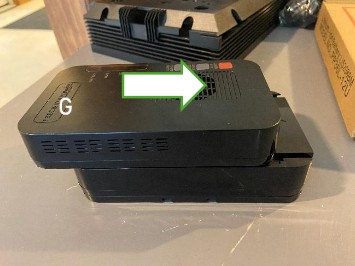
G. Stack the unit on top of the battery making sure to align the rails. It comes with a mounting bracket under the battery if you wish. If you have trouble with the unit sliding off the battery, a little electrical tape may be used but make sure to keep the vent holes unobstructed so heat can dissipate.
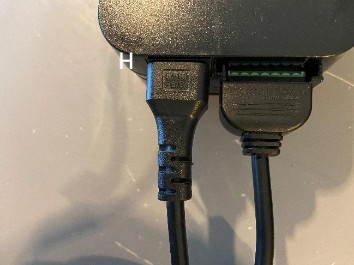
H. Plug the green connector into the green slot and the power cable into the power port. If upgrading from the older acid core battery (shown on page 1) then you may use the same cables. Plug the power cable into wall power and wait for the internet and phone services to resume. This can take up to 15 mins.
Contact your local transfer center to inquire about recycling your old battery and unit!
Troubleshooting Tips
If your service doesn’t resume after 15 mins. Check the ONT (modem). Is it getting power? If so, unplug your Wi- Fi router from power for a few moments.
If that doesn’t work, check for Service or Broadband lights on the ONT (if applicable). Are they yellow, red, or green?
Red and yellow typically indicate a light issue: make sure the fiber cable isn’t kinked or has any tight bends.
If you are still unable to access the internet or make a phone call, please give us a call 833-323-4237 or email